SpeedRunners 2 Steam Deck Guide
King of Speed on Valve's handheld — settings, controls, and performance optimization.
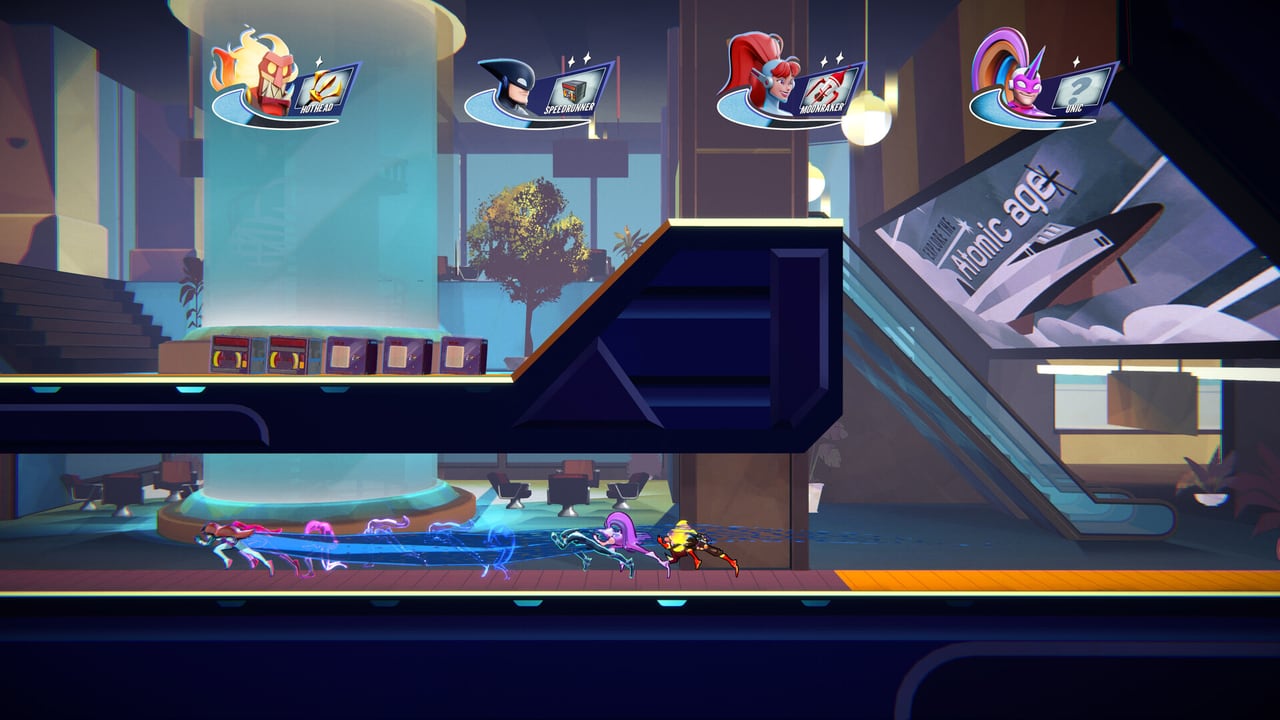
SpeedRunners 2: King of Speed runs on Steam Deck, and the experience is better than most side-scrolling racers on handheld hardware. Eight-player chaos, item effects, and dynamic camera zoom are all present and readable on the 1280x800 display. This guide covers Steam Deck compatibility status, recommended control schemes, performance settings that preserve 60 FPS in eight-player lobbies, and configuration tricks that make the handheld the best way to practice SpeedRunners 2 on the go.
Compatibility status
Valve has not issued a Steam Deck Verified badge for SpeedRunners 2 at the time of this writing, which means the game falls into the Playable category rather than the Fully Verified category. Playable means the game launches, renders, and runs without known major issues — minor compatibility quirks may exist but do not block gameplay. Fair Play Labs has not published an official Steam Deck statement; this guide reflects community testing from demo sessions and the first week of launch.
The game renders acceptably on Steam Deck hardware. The 720p native resolution keeps GPU load manageable while the 16:10 aspect ratio matches the standard 1280x800 display without pillarboxing. The primary concern is not raw performance — it is readable hazard colors and item icons at small screen size.
Controls on Steam Deck
SpeedRunners 2 maps cleanly to the Steam Deck control layout. The default control scheme assigns movement to the left stick, camera or menu navigation to the right stick, jump to A, slide to B, boost to R2, grapple to L2, and item use to R1. This layout is playable but not optimal for a game where millisecond timing matters.
The recommended control scheme for serious practice:
- Move: Left Stick (default)
- Jump: L4 (left back paddle) — replaces A, keeps thumb on left stick for last-second direction changes
- Slide: A — original L4 position
- Boost: R2 (original, keep)
- Grapple: L2 (original, keep)
- Item: R1 (original, keep)
- Pause/Menu: Steam button or View button
This swap puts jump on a back paddle so your left thumb never leaves the movement axis. In a game where wall jump timing determines survival, lifting your thumb to press A is a measurable disadvantage. Back paddle jump is the single highest-impact control change on Steam Deck.
Steam Input configuration lives in Big Picture mode. Create a game-specific layout rather than using the global layout so your changes do not carry over to other titles.
Performance settings
The Steam Deck APU (VanGogh, 4 cores, 16 GB RAM, RDNA 2 GPU) handles SpeedRunners 2 comfortably when settings are tuned. The target is locked 60 FPS in eight-player lobbies with item effects active — dropped frames during boost-heavy openings cause input lag that disrupts wall jump timing.
Start with these settings:
- Resolution: Native 1280x800 (do not upscale from lower internal resolution)
- Display Mode: Fullscreen
- V-Sync: On
- Shadow Quality: Low or Off
- Particle Effects: Medium
- Texture Quality: Medium
- Anti-Aliasing: Off or FXAA only
- Post-Processing: Off
These settings produce a stable 60 FPS in eight-player races in the demo. The only scenario that stresses the Deck is a full 64-player tournament bracket on the highest item density map — expect dips to 45–55 FPS in that specific case.
If frame time is unstable, cap the frame rate at 45 FPS using the Steam Deck’s refresh rate limit in game settings or a third-party tool. A locked 45 FPS with no drops feels more consistent than a fluctuating 60 FPS that occasionally spikes higher but also dips lower.
Battery life
SpeedRunners 2 is not a battery drainer at these settings. Expect 3.5–4.5 hours of continuous play on a full charge with screen brightness at 60% and the Steam Deck’s performance limit set to 15W (the default TDP for the Steam Deck’s performance mode). Raising brightness or enabling Wi-Fi streaming (Steam Remote Play) reduces battery life significantly.
The game is well-suited to travel sessions. A 90-minute flight gives you enough battery for two to three tournament rounds from Round 1 to finals if you start with a full charge. Bring a USB-C battery pack rated for 45W passthrough charging if you plan longer sessions.
Grapple timing on handheld
The blue ceiling grapple mechanic is the most input-sensitive skill in SpeedRunners 2. On a controller, grapple timing uses the L2 trigger with a small dead zone before activation registers. Steam Deck L2 is a digital-capable analog trigger, meaning it reads partial pull as a value below 1.0.
Configure L2 as a binary digital trigger in Steam Input rather than an analog input. Set the activation threshold to 50% pull — this gives you the feel of a trigger but the reliability of a button. Grapple windows in technical sections are 3–5 frames wide; a mushy analog read from an under-configured trigger costs you those frames.
Screen readability
The 7-inch display at 1280x800 is dense enough for SpeedRunners 2 but requires attention to color calibration. The game uses blue for grapple surfaces and red for fire wall proximity — two colors that can bleed together on screens with poor color separation. Steam Deck displays are generally well-calibrated out of the box, but verify in the tutorial section of the demo that you can distinguish:
- Blue ceiling sections from the general background
- Fire wall glow from red particle items (missiles, freeze rays)
- Green boost pads from hazard warnings
If color separation is poor, adjust the display’s color temperature toward warm in Steam Deck settings. Reducing blue output improves grapple surface contrast without hurting other readability.
vs Nintendo Switch
The Platforms page covers the Switch version in detail. The short version: Switch runs SpeedRunners 2 at 1080p60 when docked and 720p60 in handheld mode with visual settings comparable to the Steam Deck configuration above. If you own both devices, the choice between them for SpeedRunners 2 comes down to ecosystem preference and whether you value the Steam ecosystem’s modding support and save management over Switch’s physical cartridge availability and local multiplayer convenience.
Steam Deck wins for solo practice and ranked grind due to the back paddle control option and higher sustained clock performance. Switch wins for couch multiplayer sessions where friends are physically present.
Setup summary
Before your first Steam Deck session:
- Install SpeedRunners 2 from Steam library
- Open Big Picture mode and create a game-specific Steam Input layout
- Map jump to L4 or R4 back paddle
- Configure L2 (grapple) as binary digital with 50% threshold
- Set in-game resolution to native 1280x800
- Apply performance settings listed above
- Calibrate display color temperature if blue ceilings are hard to read
- Load the demo and run three laps against bots to confirm 60 FPS
Bookmark the Controls hub and PC Specs page for further reference. The Practice Planner can schedule your Steam Deck sessions as part of a broader training program.
FAQ
Does SpeedRunners 2 run well on Steam Deck? Yes. Community testing reports stable 60 FPS at native 720p-equivalent resolution with medium particle effects and low shadows. The only scenario that stresses hardware is a full 64-player tournament bracket with high item density. Most players will not notice performance issues during normal ranked or practice sessions.
What control changes are most important on Steam Deck? Moving jump to a back paddle (L4 or R4) is the highest-impact change. It keeps your left thumb on the movement stick during wall jump sequences, which matters because lifting your thumb to press A interrupts rhythm in technical sections. Secondary changes include configuring grapple trigger as a digital input rather than analog.
How is battery life for SpeedRunners 2 on Deck? Expect 3.5–4.5 hours at default brightness and 15W TDP. Reducing brightness to 50%, disabling Wi-Fi when offline, and capping frame rate at 45 FPS extends battery to approximately 5 hours. The game is suitable for travel sessions and commutes without battery anxiety.
Can I play tournaments on Steam Deck? Yes, online tournaments accept any platform that can run the game and connect to the internet. Steam Deck’s performance in eight-player ranked lobbies is equivalent to desktop performance at the same settings. The only limitation is screen size — a monitor or TV is preferred for long tournament sessions to reduce eye strain, but Deck is fully viable for bracket play.
How does Steam Deck compare to Switch for SpeedRunners 2? Both run the game well. Steam Deck edges ahead for solo ranked practice due to back paddle controls and higher sustained performance. Switch wins for local couch multiplayer with physical friends. The Platforms page covers Switch specifics in full.
Frequently Asked Questions
Quick answers to the most common questions.
Does SpeedRunners 2 run well on Steam Deck?
Yes — community testing shows stable 60 FPS at native resolution with medium particle effects and low shadows. The only stressful scenario is 64-player tournament brackets with maximum item density. Normal ranked and practice sessions run without notable frame drops.
What control changes are most important on Steam Deck?
Moving jump to a back paddle (L4 or R4) is the highest-impact change. It keeps your left thumb on the movement stick during wall jump sequences, which matters because lifting your thumb to press A breaks rhythm in technical sections. Configure grapple (L2) as a binary digital trigger at 50% threshold for reliable activation.
How is battery life for SpeedRunners 2 on Deck?
Expect 3.5–4.5 hours at default brightness (60%) and 15W TDP. Dropping to 50% brightness, disabling Wi-Fi when offline, and capping at 45 FPS extends battery to roughly 5 hours. The game is well-suited for travel and commutes.
Can I play tournaments on Steam Deck?
Yes — online tournaments accept any platform that runs the game. Steam Deck performance in eight-player ranked lobbies matches desktop at equivalent settings. A monitor is preferred for long sessions to reduce eye strain, but the Deck is fully viable for bracket play.
How does Steam Deck compare to Switch for SpeedRunners 2?
Both run the game well. Steam Deck wins for solo ranked practice due to back paddle controls and higher sustained performance. Switch wins for local couch multiplayer with physical friends. See the [Platforms](/review/platforms/) page for full Switch specifics.