SpeedRunners 2 Accessibility & Input
Settings that let every runner hit the fire-wall-ready line on launch day.
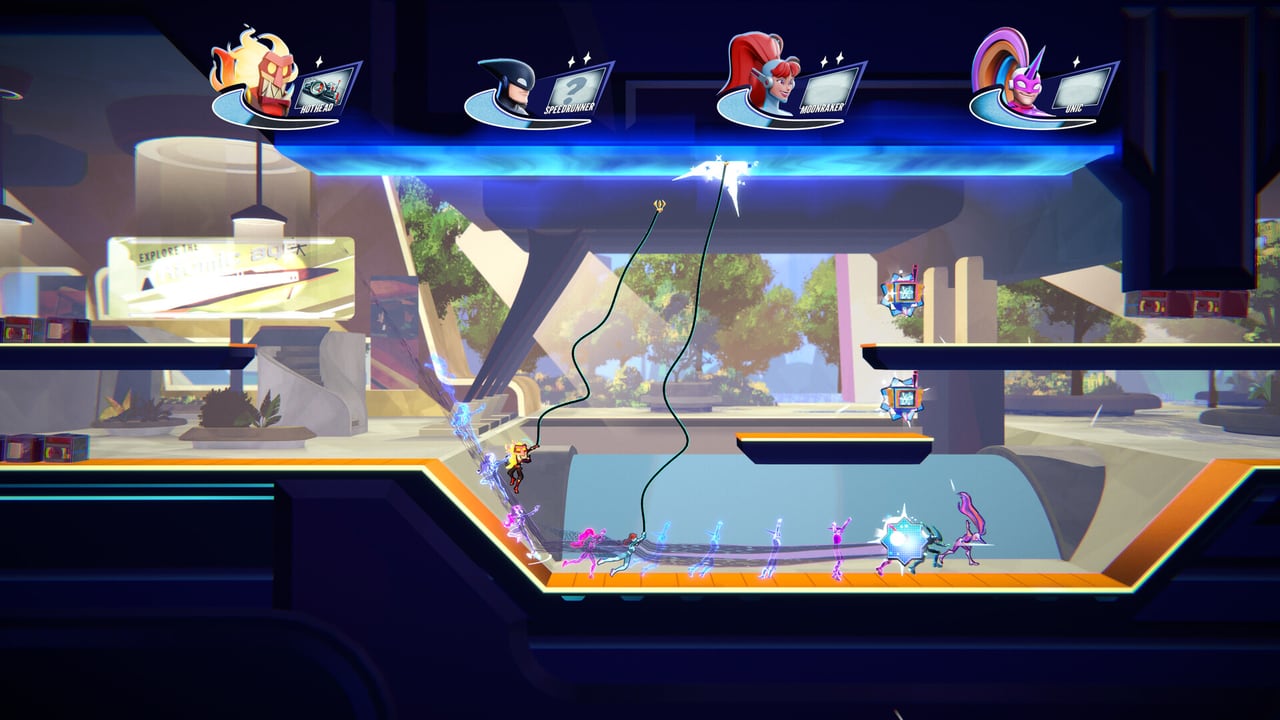
SpeedRunners 2: King of Speed aims to be inclusive from day one. Fair Play Labs has shipped multiple accessibility options in the Steam demo, and the release build is expected to add to that set with continued patches through the September 3, 2026 launch window. This page is a practical reference for the settings that matter most — colorblind palettes, HUD opacity, motion-reduction toggles, and input flexibility.
Why accessibility matters for a competitive platformer
The “Mario Kart of 2D platformers” framing makes SpeedRunners 2 sound casual, but the skill ceiling is real. Movement inputs need to be frame-perfect, item timing needs to be sub-second, and HUD readability needs to be instant. Accessibility settings are not concessions to casual play — they are the difference between a player who can read the game and a player who cannot. Fair Play Labs recognizes this and has shipped the demo with sensible defaults.
Colorblind palettes and hazard distinction
SpeedRunners 2 has a deliberately vibrant palette: neon teal boost strips, magenta grapple ceilings, red missile trails, blue freeze rays. For players with red-green colorblindness (deuteranopia and protanopia, the most common forms), the red-blue missile versus blue-freeze distinction can blur in dense eight-player packs. The Steam demo includes a colorblind mode toggle in Settings > Accessibility that swaps the red missile-lock warning to a high-contrast yellow.
If you have a less common form of color vision difference (tritanopia), check the in-game color palette preview before queuing ranked. The Audio Cues page covers how to fall back on sound for item identification when visual cues fail.
HUD opacity and screen clutter
Eight-player missile storms stack dozens of effects on screen at once. The default HUD opacity is tuned for clean visibility, but if you find the boost meter, item icon, and placement overlay crowding the action, the HUD Opacity slider in Settings lets you reduce it to 30–60% without losing readability. Some players prefer HUD at 0% during a clean race and bump it back up to confirm boost meter status.
The HUD also exposes a “minimal mode” toggle that hides everything except the boost meter and the elimination warning. Minimal mode is competitive on PC where players can reference the Controls Cheatsheet externally, and friendly on console where screen real estate is tighter.
Motion reduction settings
SpeedRunners 2 includes high-frame-rate animations on slide, wall jump, and grapple swing. Players sensitive to motion sickness or rapid camera scrolling can enable:
- Reduced camera scroll. Slows the camera tracking speed by 25%. This makes the game feel less frantic but adds roughly half a second of recovery time per race.
- Slide animation damping. Reduces the visual blur effect on slide entries. The gameplay effect is unchanged; only the visual cue is dampened.
- Grapple swing easing. Smooths the swing arc for players who find the rapid arc disorienting.
None of these settings change the underlying skill ceiling. They change how much visual information the game asks you to absorb in each frame.
Input flexibility and adaptive controllers
Every major input device is supported at launch: keyboard, Xbox Wireless controller, DualSense, Nintendo Switch Pro Controller, Joy-Cons, and Steam Input-compatible gamepads. The Steam Input layer means exotic controllers (Fight Sticks, accessibility-focused gamepads like the Xbox Adaptive Controller, and Steam Deck gyro) can be remapped to whatever input scheme suits you.
Specific notes:
- Keyboard: see Keyboard Controls for default binds and Rebind Tips for analog-feel rebinds.
- Controller: see Controller Layout for the recommended Xbox and PlayStation schemes.
- Steam Deck: see Steam Deck Guide for the Verified handheld setup.
- Adaptive controllers: the Xbox Adaptive Controller and the PlayStation Access Controller are both plug-and-play on PC via Steam Input. The in-game button prompts may not always reflect custom binds, so pair adaptive input with the minimal HUD mode for clean feedback.
Input lag, monitor refresh, and controller latency
Competitive players should be aware of three latency sources:
- Monitor refresh rate. 144Hz monitors reduce input lag noticeably over 60Hz displays. The Platform Comparison page covers hardware choices.
- Controller wireless latency. Bluetooth controllers have a small but consistent latency penalty versus wired. Use wired for tournament play.
- Display processing. “Game mode” on TVs reduces display-side lag dramatically. Console players should always enable Game mode for SpeedRunners 2.
Text chat and language settings
The Steam demo includes text chat in English with platform-level translation layers. Console versions follow Microsoft, Sony, and Nintendo chat policies respectively. The cross-platform chat policy is finalized through publisher messaging — see Crossplay for the platform-by-platform breakdown.
For players who prefer to mute text chat entirely (recommended for tournament play), the Lobby Etiquette page covers the etiquette around muting and push-to-talk voice.
Parental controls and family launch nights
SpeedRunners 2 will onboard large numbers of Game Pass newcomers on September 3, 2026. Family launch nights need parental controls configured before launch day. The platform-specific controls cover chat permissions, friend invite policies, and playtime limits.
- Xbox: Settings > Family > Manage family members.
- PlayStation: Settings > Family and Parental Controls.
- Nintendo Switch: System Settings > Parental Controls.
- Steam: Steam Settings > Family.
Keeping accessibility settings consistent
Accessibility settings are saved per Steam account, per console profile, and per Switch user. If you play on multiple platforms, expect to reconfigure on each one. The Cross-Platform Progress page covers how settings sync (currently: not at the OS level).
Related
- Controls Hub — the binding overview
- Keyboard Controls — PC-specific binds
- Controller Layout — Xbox, DualSense, Switch Pro
- Rebind Tips — analog-feel rebinds
- Steam Deck Guide — handheld setup
- Lobby Etiquette — chat and voice norms
Frequently Asked Questions
Quick answers to the most common questions.
Does SpeedRunners 2 have colorblind modes?
Yes — the Steam demo includes a colorblind toggle in Settings > Accessibility. Tritanopia players should preview the palette before ranked and rely on the [Audio Cues](/guides/audio-cues/) for item identification.
Can I reduce motion sickness settings?
Yes — Settings > Accessibility exposes reduced camera scroll, slide animation damping, and grapple swing easing. None change the skill ceiling.
Does it support the Xbox Adaptive Controller?
Yes — via Steam Input on PC. Pair with minimal HUD mode for clean feedback. Console compatibility depends on the platform mapping layer.
Can I lower HUD opacity?
Yes — the HUD opacity slider goes from 100% to 30%. Minimal HUD mode hides everything except the boost meter and elimination warning.
Are settings saved per platform?
Settings save per account on each platform. Cross-platform settings sync is not supported at the OS level — see [Cross-Platform Progress](/tools/cross-platform-progress/).